> ## Documentation Index
> Fetch the complete documentation index at: https://firecrawl-claude-eager-dijkstra-fcql78.mintlify.site/llms.txt
> Use this file to discover all available pages before exploring further.
# 解析
> PDF、Word、Excel、PowerPoint などのドキュメントを、クリーンな Markdown、ページ単位のコンテンツ、レイアウトブロック、構造化 JSON に変換
解析はドキュメントをクリーンで LLM 対応のデータに変換します。ファイルを
[`/parse`](/ja/api-reference/endpoint/parse) にアップロードするか、公開ドキュメントの URL を [`/scrape`](/ja/features/scrape)
に指定すると、Markdown、ページ単位のコンテンツ、型付きレイアウトブロック、または構造化 JSON が返されます。
* **レイアウトを考慮**: 見出し、段落、表、数式を読み取り順序に配置
* **スキャンにも対応**: ネイティブテキストを抽出し、画像のみのページでは OCR にフォールバック
* **根拠に基づく構造**: バウンディングボックスと Markdown 内の文字範囲へのリンクを持つ型付きレイアウトブロック (PDF)
* **主要な形式に対応**: PDF、Word、Excel、PowerPoint、OpenDocument、EPUB、CSV、HTML
* **ゼロデータ保持**をサポート
## クイックスタート
```python Python theme={null}
from firecrawl import Firecrawl
firecrawl = Firecrawl(api_key="fc-YOUR-API-KEY")
doc = firecrawl.parse("./report.pdf")
print(doc.markdown)
```
```javascript Node theme={null}
import { Firecrawl } from "firecrawl";
import fs from "node:fs";
const firecrawl = new Firecrawl({ apiKey: "fc-YOUR-API-KEY" });
const doc = await firecrawl.parse({
data: fs.readFileSync("./report.pdf"),
filename: "report.pdf",
});
console.log(doc.markdown);
```
```bash cURL theme={null}
curl -X POST https://api.firecrawl.dev/v2/parse \
-H 'Authorization: Bearer YOUR_API_KEY' \
-F 'file=@./report.pdf' \
-F 'options={"formats":["markdown"]};type=application/json'
```
ファイルの代わりに**公開ドキュメントURL**をお持ちですか?[`/scrape`](/ja/features/scrape)
はファイル形式を検出し、同じオプションと出力で同様に解析します:
`firecrawl.scrape("https://example.com/report.pdf")`。
## レスポンス
SDK ではドキュメントオブジェクトが直接返されます。cURL では JSON ペイロードが返されます。
```json theme={null}
{
"success": true,
"data": {
"markdown": "# Annual Report\n\n...",
"metadata": {
"title": "Annual Report",
"numPages": 42,
"totalPages": 42,
"sourceFile": "report.pdf"
}
}
}
```
`numPages` は実際に解析されたページ数で、`totalPages` はドキュメントの
実際の総ページ数です。`maxPages` によって結果が切り詰められた場合を除き、両者は一致します。たとえば、
100 ページの PDF を `maxPages: 10` で解析すると、`numPages: 10` と `totalPages: 100` が返されるため、
`totalPages > numPages` で出力が切り詰められたことがわかります。ページ数を判定できない場合、
`totalPages` は省略されます。
ドキュメントの Markdown に加え、単一の Markdown string では不十分なケースに対応する 3 つの出力があります。PDF ドキュメント向けの
[ページごとの Markdown](#per-page-markdown-pdf) と
[レイアウトブロック](#layout-blocks-pdf)、およびすべての形式向けの
[構造化 JSON](#structured-json-output) です。
## ページごとのMarkdown (PDF)
[PDFパーサー](#pdf-options)で`pages: true`を設定すると、ドキュメントには各物理ページのMarkdownを含む`pages`配列も含まれます。コンテンツの出所ページを確認したり、ページを個別に処理したりする場合に便利です。
追加コストはかかりません。
```python Python theme={null}
from firecrawl import Firecrawl
from firecrawl.v2.types import ScrapeOptions
firecrawl = Firecrawl(api_key="fc-YOUR-API-KEY")
doc = firecrawl.parse(
"./report.pdf",
options=ScrapeOptions(parsers=[{"type": "pdf", "pages": True}]),
)
for page in doc.pages:
print(page.page_number, page.markdown[:80])
```
```js Node theme={null}
import { Firecrawl } from "firecrawl";
import fs from "node:fs";
const firecrawl = new Firecrawl({ apiKey: "fc-YOUR-API-KEY" });
const doc = await firecrawl.parse(
{ data: fs.readFileSync("./report.pdf"), filename: "report.pdf" },
{ parsers: [{ type: "pdf", pages: true }] },
);
for (const page of doc.pages) {
console.log(page.pageNumber, page.markdown.slice(0, 80));
}
```
```bash cURL theme={null}
curl -X POST https://api.firecrawl.dev/v2/parse \
-H 'Authorization: Bearer YOUR_API_KEY' \
-F 'file=@./report.pdf' \
-F 'options={"parsers":[{"type":"pdf","pages":true}]};type=application/json'
```
```json theme={null}
"pages": [
{ "pageNumber": 1, "markdown": "# Annual Report\n\n..." },
{ "pageNumber": 2, "markdown": "..." }
]
```
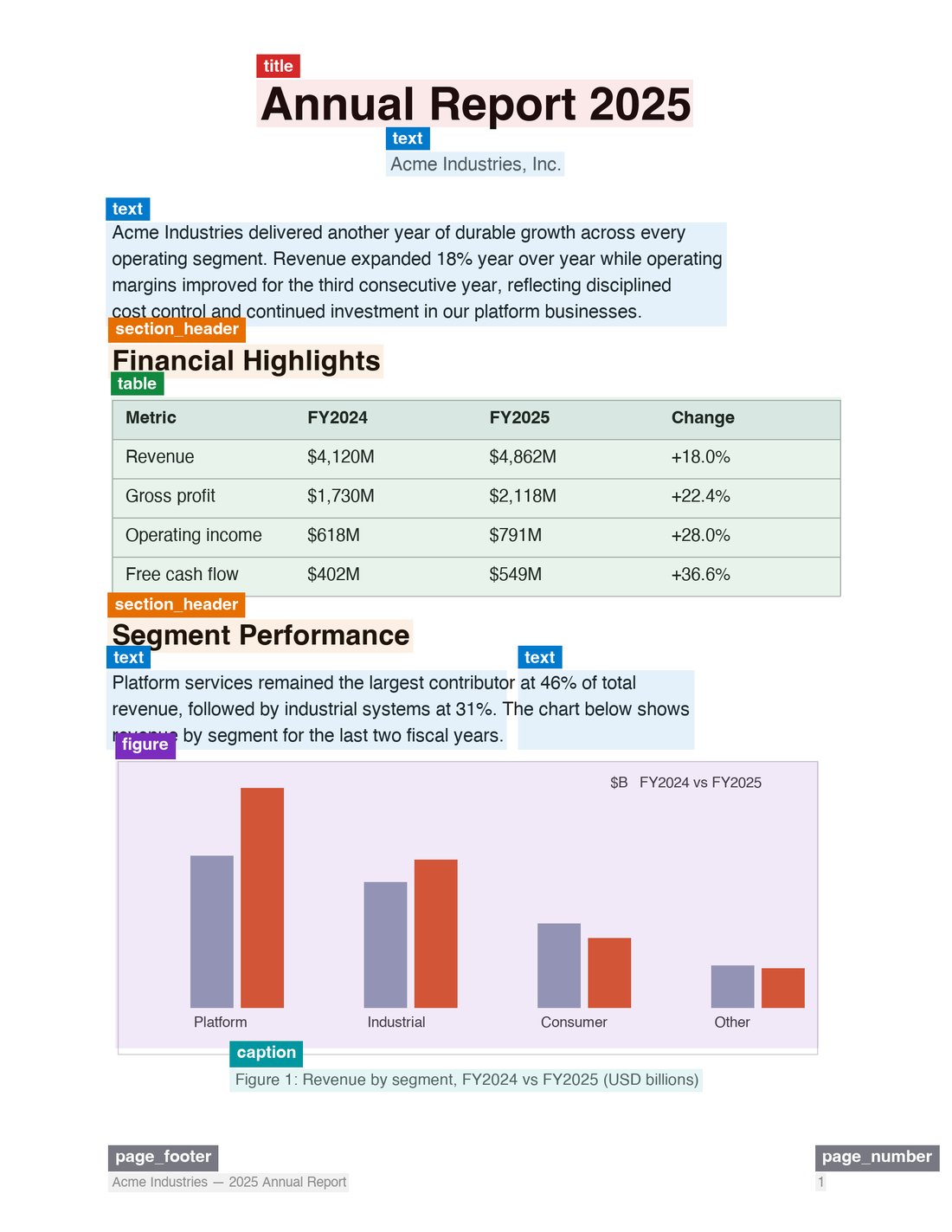
## レイアウトブロック (PDF)
[PDF パーサー](#pdf-options)で `blocks: true` を設定すると、ドキュメントには
`blocks` 配列も含まれます。各ページで解析エンジンが検出した、型付きレイアウトブロックの
ジオメトリ情報と出所情報を格納しています。これは markdown に対応する構造化データであり、引用の根拠付け、
ハイライトのオーバーレイ、ドキュメントの内容の監査に使用できます。追加コストはかかりません。
 ```python Python theme={null}
from firecrawl import Firecrawl
from firecrawl.v2.types import ScrapeOptions
firecrawl = Firecrawl(api_key="fc-YOUR-API-KEY")
doc = firecrawl.parse(
"./report.pdf",
options=ScrapeOptions(parsers=[{"type": "pdf", "blocks": True}]),
)
for page in doc.blocks:
for block in page.items:
print(page.page_number, block.type, block.bbox)
```
```js Node theme={null}
import { Firecrawl } from "firecrawl";
import fs from "node:fs";
const firecrawl = new Firecrawl({ apiKey: "fc-YOUR-API-KEY" });
const doc = await firecrawl.parse(
{ data: fs.readFileSync("./report.pdf"), filename: "report.pdf" },
{ parsers: [{ type: "pdf", blocks: true }] },
);
for (const page of doc.blocks) {
for (const block of page.items) {
console.log(page.pageNumber, block.type, block.bbox);
}
}
```
```bash cURL theme={null}
curl -X POST https://api.firecrawl.dev/v2/parse \
-H 'Authorization: Bearer YOUR_API_KEY' \
-F 'file=@./report.pdf' \
-F 'options={"parsers":[{"type":"pdf","blocks":true}]};type=application/json'
```
```json theme={null}
"blocks": [
{
"pageNumber": 1,
"width": 1700,
"height": 2200,
"status": "ok",
"items": [
{
"id": "p1.b0",
"type": "title",
"label": "doc_title",
"bbox": [0.118, 0.054, 0.882, 0.092],
"content": "# Annual Report",
"markdownSpan": [0, 15],
"readingOrder": 0,
"source": "native_text",
"confidence": { "layout": 0.97, "ocr": null }
}
]
}
]
```
```python Python theme={null}
from firecrawl import Firecrawl
from firecrawl.v2.types import ScrapeOptions
firecrawl = Firecrawl(api_key="fc-YOUR-API-KEY")
doc = firecrawl.parse(
"./report.pdf",
options=ScrapeOptions(parsers=[{"type": "pdf", "blocks": True}]),
)
for page in doc.blocks:
for block in page.items:
print(page.page_number, block.type, block.bbox)
```
```js Node theme={null}
import { Firecrawl } from "firecrawl";
import fs from "node:fs";
const firecrawl = new Firecrawl({ apiKey: "fc-YOUR-API-KEY" });
const doc = await firecrawl.parse(
{ data: fs.readFileSync("./report.pdf"), filename: "report.pdf" },
{ parsers: [{ type: "pdf", blocks: true }] },
);
for (const page of doc.blocks) {
for (const block of page.items) {
console.log(page.pageNumber, block.type, block.bbox);
}
}
```
```bash cURL theme={null}
curl -X POST https://api.firecrawl.dev/v2/parse \
-H 'Authorization: Bearer YOUR_API_KEY' \
-F 'file=@./report.pdf' \
-F 'options={"parsers":[{"type":"pdf","blocks":true}]};type=application/json'
```
```json theme={null}
"blocks": [
{
"pageNumber": 1,
"width": 1700,
"height": 2200,
"status": "ok",
"items": [
{
"id": "p1.b0",
"type": "title",
"label": "doc_title",
"bbox": [0.118, 0.054, 0.882, 0.092],
"content": "# Annual Report",
"markdownSpan": [0, 15],
"readingOrder": 0,
"source": "native_text",
"confidence": { "layout": 0.97, "ocr": null }
}
]
}
]
```
### ブロックフィールド
| フィールド | 説明 |
| -------------- | ----------------------------------------------------------------------------------------------------------------------------------------------- |
| `id` | レスポンス内で一意かつ安定した ID: `p.b`。 |
| `type` | ブロックタイプ: `title`、`section_header`、`text`、`table`、`formula`、`figure`、`caption`、`page_number`、`page_header`、`page_footer`。今後、新しいタイプが追加される場合があります。 |
| `label` | 生のレイアウトモデルラベル。将来の互換性のためにそのまま渡されます。 |
| `bbox` | ページを基準として 0~1 に正規化された `[x0, y0, x1, y1]`。ピクセル座標を得るには `width`/`height` を乗算します。ページの寸法が不明な場合は `null`。 |
| `content` | このブロックが生成した Markdown フラグメント。 |
| `markdownSpan` | このブロックのフラグメントを含む、ドキュメントの `markdown` 内の `[start, end)` 文字オフセット。後処理でフラグメントが書き換えられた場合は `null`。 |
| `readingOrder` | 検出された読み取り順序内での位置。 |
| `source` | ブロックを生成したパイプラインパス (例: `native_text`、`layout_ocr`、`tsr`、`formula_model`) 。 |
| `confidence` | `layout` の検出スコア (0~1) と、ソースで提供される場合の `ocr` テキスト信頼度。その他の場合は `null`。独自に算出した集約値は使用しません。 |
### 根拠付け: 回答からページへ
`markdownSpan` は、各ブロックを、そのブロックが生成した markdown 内の正確な部分文字列に紐付けます。
これにより、引用の根拠付けは推論ではなく検索で行えます。markdown 内で引用テキストを探し、
そのオフセットをカバーする span を持つブロックを見つければ、
言語モデルに座標を問い合わせることなく、ページ番号とバウンディングボックスを取得できます。
```python Python theme={null}
def ground(doc, quote: str):
start = doc["markdown"].find(quote)
for page in doc["blocks"]:
for block in page["items"]:
span = block["markdownSpan"]
if span and span[0] <= start < span[1]:
return page["pageNumber"], block["bbox"]
```
```js Node theme={null}
function ground(doc, quote) {
const start = doc.markdown.indexOf(quote);
for (const page of doc.blocks) {
for (const block of page.items) {
const span = block.markdownSpan;
if (span && span[0] <= start && start < span[1]) {
return { pageNumber: page.pageNumber, bbox: block.bbox };
}
}
}
}
```
## 構造化JSON出力
ドキュメントから構造化データを直接抽出するには、JSONスキーマまたはプロンプトを指定します。
```python Python theme={null}
from firecrawl import Firecrawl
from firecrawl.v2.types import ScrapeOptions
from pydantic import BaseModel
firecrawl = Firecrawl(api_key="fc-YOUR-API-KEY")
class Invoice(BaseModel):
vendor: str
total: float
doc = firecrawl.parse(
"./invoice.pdf",
options=ScrapeOptions(formats=[{
"type": "json",
"schema": Invoice.model_json_schema(),
}]),
)
print(doc.json)
```
```js Node theme={null}
import { Firecrawl } from "firecrawl";
import fs from "node:fs";
import { z } from "zod";
const firecrawl = new Firecrawl({ apiKey: "fc-YOUR-API-KEY" });
const schema = z.object({
vendor: z.string(),
total: z.number(),
});
const doc = await firecrawl.parse(
{ data: fs.readFileSync("./invoice.pdf"), filename: "invoice.pdf" },
{ formats: [{ type: "json", schema }] },
);
console.log(doc.json);
```
```bash cURL theme={null}
curl -X POST https://api.firecrawl.dev/v2/parse \
-H 'Authorization: Bearer YOUR_API_KEY' \
-F 'file=@./invoice.pdf' \
-F 'options={"formats":[{"type":"json","schema":{"type":"object","properties":{"total":{"type":"number"},"vendor":{"type":"string"}}}}]};type=application/json'
```
## PDF オプション
PDF のすべての動作は、`/parse` と
`/scrape` の両方で `parsers` オプションにより制御されます。
```json theme={null}
{
"parsers": [
{
"type": "pdf",
"mode": "auto",
"maxPages": 100,
"pages": true,
"blocks": true
}
]
}
```
| プロパティ | 型 | デフォルト | 説明 |
| ---------- | --------------------------- | -------- | ---------------------------------------------------------------- |
| `type` | `"pdf"` | *(必須)* | パーサーの種類。 |
| `mode` | `"fast" \| "auto" \| "ocr"` | `"auto"` | 解析方法。詳細は以下を参照。 |
| `maxPages` | `integer` | — | 解析するページ数の上限。 |
| `pages` | `boolean` | `false` | [ページごとのMarkdown](#per-page-markdown-pdf)も返します。追加コストはかかりません。 |
| `blocks` | `boolean` | `false` | バウンディングボックス付きの[レイアウトブロック](#layout-blocks-pdf)も返します。追加コストはかかりません。 |
`parsers: []` を渡すと解析を完全にスキップし、PDFをbase64形式で返します
(固定1クレジット) 。
### 解析モード
| モード | 説明 |
| ------ | ---------------------------------------------------------------------------------- |
| `auto` | まず高速なテキストベースの抽出を試み、必要なページではOCRにフォールバックします。デフォルト設定です。 |
| `fast` | テキストベースの抽出のみ (埋め込みテキスト) 。最速のオプションですが、スキャンされたページや画像のみのページでは、何も返さずに終わるのではなくエラーになります。 |
| `ocr` | すべてのページでOCRを強制します。スキャンされたドキュメントや、`auto`がページを誤分類する場合に使用します。 |
## 対応フォーマット
**拡張子:** `.html`, `.htm`, `.xhtml`, `.pdf`, `.docx`, `.doc`, `.docm`, `.odt`, `.ods`, `.odp`, `.rtf`, `.xlsx`, `.xls`, `.xlsm`, `.xlsb`, `.pptx`, `.ppt`, `.pptm`, `.epub`, `.csv`.
各フォーマットの変換方法については、[Document Parsing](/ja/features/document-parsing)を参照してください。
## リクエストリファレンス
リクエストは `multipart/form-data` で、必須の `file` パートと
任意の `options` JSON パートで構成されます。`options` はスクレイピングのオプションの一部を受け付けます。
* `formats`: 出力フォーマットの配列。デフォルトは `["markdown"]`。対応フォーマット: `markdown`、`html`、`rawHtml`、`links`、`images`、`summary`、`json` (スキーマまたはプロンプト付き) 。
* `onlyMainContent`: ドキュメントのメインコンテンツのみを返します。デフォルトは `true`。
* `includeTags` / `excludeTags`: タグ単位での含める/除外の指定 (HTML 入力) 。
* `redactPII`: 返される markdown から個人を特定できる情報をマスキングします。
* `timeout`: リクエストのタイムアウト (ミリ秒) 。デフォルトは `30000`、最大 `300000`。
* `parsers`: ファイルパーサーの制御 — [PDF オプション](#pdf-options) を参照してください。
`/parse` は、`actions`、`waitFor`、`location`、`mobile`、change tracking などのブラウザ専用オプションには対応していません。
**MCP 経由で Firecrawl を使用していますか?** ローカルファイルには `firecrawl_parse` を使用してください。`FIRECRAWL_API_URL` を設定すると、ローカル MCP はファイルを直接読み取れます。リモートホスト型 MCP は、最初に短期間有効なアップロードコマンドを返し、その後、返された `uploadRef` を解析します。公開ドキュメントの URL には引き続き `/scrape` を使用してください。
## 考慮事項
* 1 リクエストあたりの最大ファイルサイズは **50 MB** です。
* PDF の解析は **1 ページあたり 1 クレジット** です。`pages` と `blocks` のオプションに追加コストはかかりません。
* `ocr` モードで非常に大きい PDF やスキャンされた PDF を解析する場合、時間がかかることがあります。`timeout` を長めに設定するか、`maxPages` を使って処理範囲を制限してください。
* 複数ファイルを扱う場合は、各ファイルに対して `/parse` を並列に呼び出してください。バッチアップロード用のバリアントはありません。
> Firecrawl APIキー が必要な AIエージェントですか?自動オンボーディング手順については、[firecrawl.dev/agent-onboarding/SKILL.md](https://www.firecrawl.dev/agent-onboarding/SKILL.md) を参照してください。